TangoWrist Complete Guide | How to Use the Apple Watch Flashcard Learning App
Last Updated: August 16, 2025
TangoWrist is the best flashcard app for Apple Watch, designed for efficient vocabulary learning and memorization. Perfect for TOEFL, IELTS, language learning, professional development, and exam preparation. This comprehensive guide shows you how to maximize your study time using spaced repetition (SRS), create custom decks, and learn on-the-go with your Apple Watch. Whether you're a student, professional, or language learner, discover how to transform idle moments into productive study sessions.
1. Installing the App
- Search for "TangoWrist" on the App Store or access the App Store from the download link on this site to install on iPhone.
- After installation, it will automatically install on your paired Apple Watch.
2. Creating Folders and Decks
In TangoWrist: Folders = Genres (e.g., English vocabulary, certification terms) Decks = Card collections (e.g., TOEIC Part 1, historical dates)
- Create a new folder using the "+" button in the iPhone app. Tap the blue pencil icon next to the folder name to rename or delete it.

- Add decks within folders
- Create cards within decks
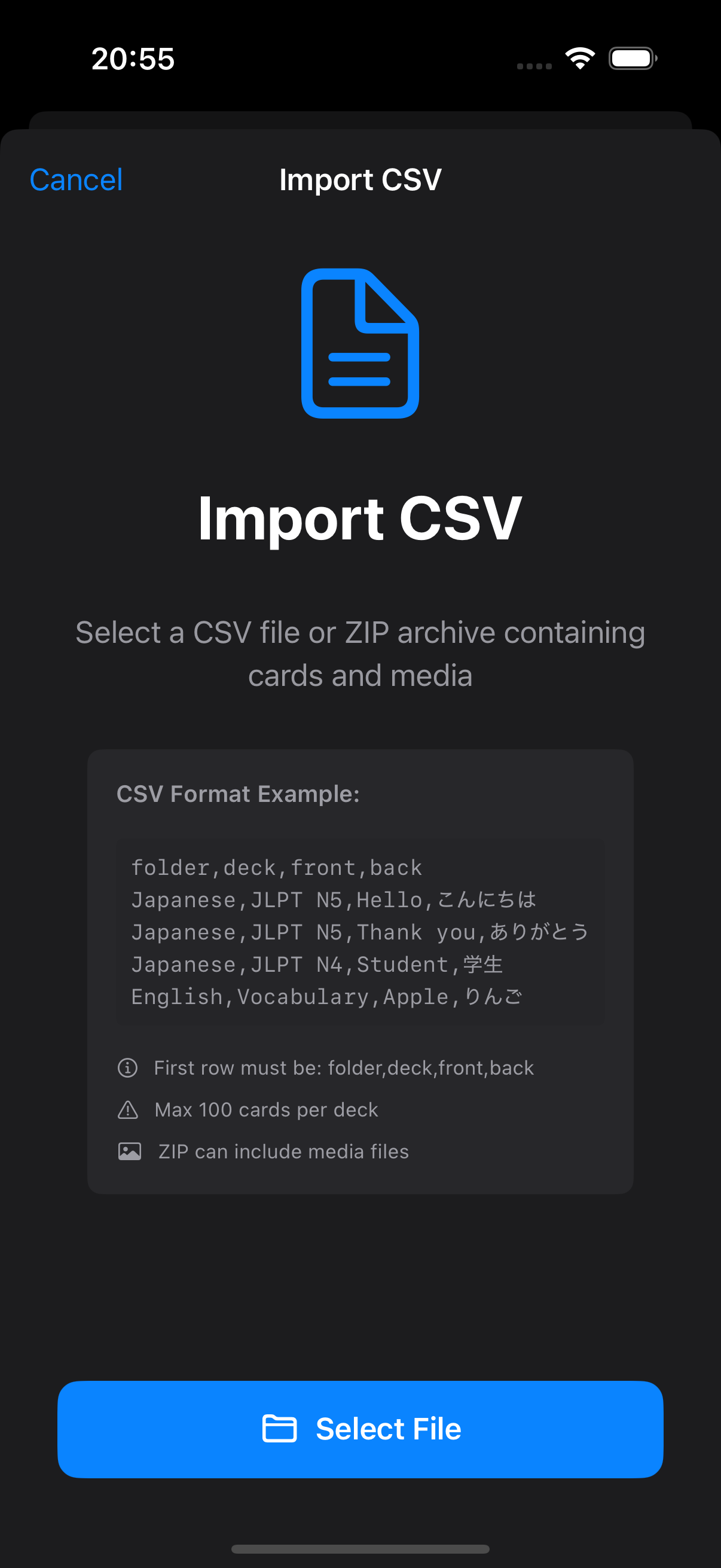
3. Bulk Registration with CSV
If you have an existing word list, you can register them all at once with CSV. CSV import is available from the button in the top left of the main screen.
CSV column order: folder, deck, front, back Export function available for backup and integration with other tools. Export button is in the settings screen.
4. Learning on Apple Watch
The Apple Watch app is designed for "wrist-only" learning.
Basic Operations
Tap: Navigate between cards X and Check buttons: Proceed to next card Press X button when you don't know, Check button when you do.Auto-advance Mode
Activate with the triangle button at the bottom Cards automatically flip and advance Adjust speed from 0.5 to 10 seconds in iPhone settings Convenient when hands are occupied (e.g., during work)5. SRS (Spaced Repetition) and Review Mode
SRS: Automatically adjusts review timing based on whether you knew the answer Review Mode: Focus study on missed cards and cards due for review6. Learning Records and Motivation
Statistics: Automatically records study time, accuracy rate, streak days Notifications: Receive reminders for cards awaiting review and scheduled study times7. Works Offline
All features work completely offline- Data stored on device, protecting privacy