Seamless Data Bridge with Anki - APKG Import & Auto-Play Audio Features Added
TangoWrist's latest update brings the highly anticipated APKG file import feature for Anki users. Previously, manual conversion to CSV format was required, but now you can easily import decks created in Anki directly.
APKG Import Support
From Anki's standard APKG (.apkg) file format, not only card data but also associated images and audio files are automatically imported. Essential pronunciation audio and visual images for language learning can now be migrated with a single tap.
Supported formats: APKG (Anki Package) CSV (as before) ZIP (cards with media sets)

APKG file import screen. CSV format examples are also displayed for intuitive operation.
Auto-Play Audio Feature
We've added a new Auto-Play Audio feature to further enhance learning efficiency. When a card is displayed, registered audio is automatically played, eliminating the need to manually press the play button.
This feature is especially useful for: Hands-free learning while walking or running Learning while cooking or doing household chores Smart reviews on Apple Watch
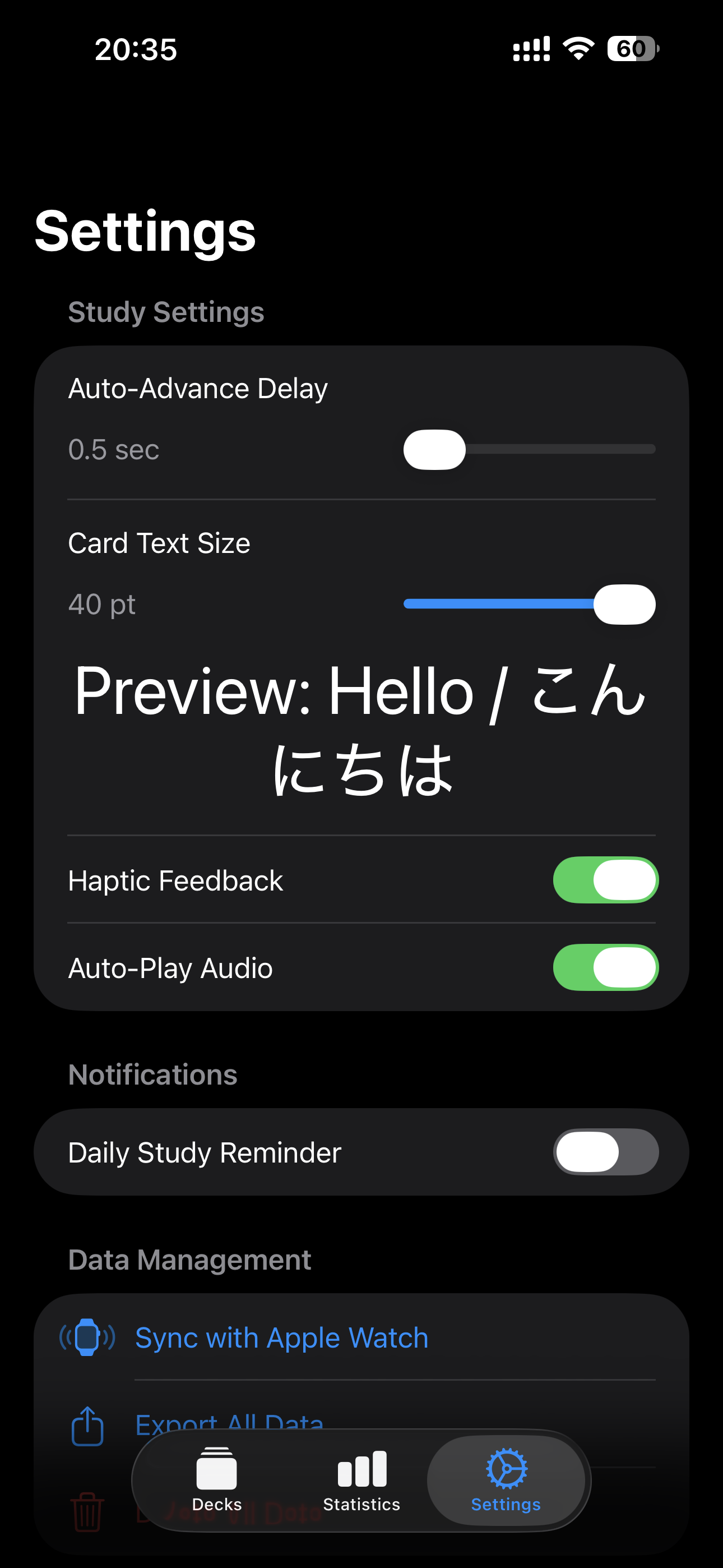
Easily toggle "Auto-Play Audio" on/off from the settings screen. Other learning settings such as card text size and haptic feedback are also customizable.
Summary
With this update, data integration with Anki, used worldwide, has become even smoother. You can now easily review large volumes of study cards created on PC or smartphone on your Apple Watch.
Please try out the new features and enjoy a more efficient learning experience!